Work orders complete:
162,003

Field service software for equipment dealers

‍‍Dealerships that service forklifts, warehouse equipment and heavy machinery. Technicians run the whole job from a tablet. Basement, cooler, back of the plant, no signal needed.

Thank you! Your submission has been received!
Oops! Something went wrong while submitting the form.
No canned demo. A conversation with someone who knows this work.

field services

10

offline working

Keeps working when the signal does not

Basements, coolers, the back of a plant, remote yards. Coverage drops and the job carries on.

Connected
Work order 4471
Labor 1.5 hr
Synced
Part hydraulic seal ×2
Synced
Photo mast, before
Synced
Note fork wear noted
Synced
Last sync 11:04:22
Up to date
One dealer moved to MSPLift specifically because their previous tool could not work offline. In the field they called it a real difference.
What it includes
Full capture with no connection
Time, parts, notes and photos
Syncs the moment signal returns
No holds, no error screens
Nothing re-entered
No lost jobs
Confirmation the work saved
Same experience either way

Most field service software assumes a connection. Equipment does not break in places with good coverage.

The technician works exactly as they would with a signal.
Everything is captured on the device.
When the connection returns, it syncs on its own.
A quiet confirmation shows the work has saved.

Why it is a switching trigger

This is the single capability dealers name when they explain why they moved. Everything else can be worked around. This cannot.

What the technician sees

No holds, no spinners, no error screens, no re-entry. The experience is the same whether there is a signal or not, which is the point.

work orders

Work orders, opened in the field

No call to the shop. No number read back down the phone. No typing the same details in twice.

Work order 4471
Opened on site 09:14
Unit info
Parts
Labor
Solution
Forms
Make / model
Serial
Parts fitted
Hours
Solution
Signature
6 of 6 complete
Submitted for closing
It cuts out the middleman, so technicians are not constantly contacting somebody back at the shop to do something for them.
Papé Material Handling — pending approval
What it includes
Opened by the technician on arrival
Job detail on the tablet
Approved and quoted work
Mixed-brand fleets on one order
Field and shop work in one system
Status visible to the office live
Nothing re-entered later
Works with no signal

The single biggest change dealers describe is this one. The technician stops depending on someone at a desk to start the job.

The technician arrives on site and opens the work order themselves, on the tablet.
Equipment history, parts availability and van stock are already attached.
Labor, parts, notes and photos go on as the work happens.
The customer signs on the tablet and the job is submitted for closing.

What it replaces

Pulling up a form, calling the dispatcher, waiting while she opens a work order, having the number read back, then transferring all of it in and typing everything again.

Why it matters

Twenty minutes at the start of every job, multiplied by every technician, every day. And a dispatcher who spends her morning opening work orders instead of dispatching.

invoicing

Invoices out in 24 hours, not three weeks

Billing goes out while the visit is still fresh with the customer, because the paperwork is already done.

Captured on site
Invoice 8841
Labor 1.5 hr
Parts ×2
Signature 15:38
Labor $142.50
Parts $88.40
Total $230.90
Nothing rekeyed
Closed 15:42 · invoiced 16:08
Invoicing now goes out within 24 hours of the job being completed, where it was sometimes two to three weeks.
Pape Material Handling — pending approval
What it includes
Billed from captured data
Nothing rekeyed
Signature attached
Parts and labour priced
Flows to your ERP
Much shorter cash cycle
Fewer disputes
Customer AP can match and approve

This is the number that gets a dealer principal’s attention. Weeks of working capital, released.

The job closes with everything already captured.
Parts, labor and the signature travel with it.
The invoice is raised from real data, not a retyped ticket.
It reaches the customer while they still remember the visit.

On the customer’s side

Their accounts payable clerk receives an invoice with the detail and signature attached, so it can be matched and approved without a phone call.

On your side

Cash collected weeks earlier, and a much shorter argument when something is queried. The evidence was captured at the machine.

equipment history

Every machine’s history, before the job starts

What was done last visit, what was flagged for next time, and the documentation to go with it.

The technician knows exactly what was done and what needs to be done on that lift truck.
Fairchild Equipment — pending approval
What it includes
Full service history per unit
What was done, what still needs doing
Service and operator documentation
Meter and hour readings
Warranty status
Any brand in the fleet
Searchable by asset
Available offline

A technician who knows what happened last time fixes it right this time. This is the difference between a repair and a repeat visit.

Open the work order and the machine’s record is already attached.
Read what was done last visit, and what was flagged for next time.
Check documentation without calling the office or carrying a manual.
Add to the record as you work, so the next technician has it too.

Mixed-brand fleets

Dealers carry dozens of manufacturers. One record per machine, whatever badge is on it, so a technician is never guessing because the unit came from a different line.

It compounds

Every job makes the next one faster. The record gets better the longer you run it, and it stays with the machine even when the technician who wrote it has moved on.

parts and stock

Parts availability, checked from the field

Including what is already sitting on the van, without calling the parts counter to ask.

Fewer calls to the counter, and fewer return visits for a part that was on the truck the whole time.
What it includes
Live parts availability
Van stock visibility
Parts posted to the work order
Cost controls that protect margin
Usage feeds replenishment
Supersessions and alternates
Ordered from the field
Works with no signal

Parts is where service margin is won or lost. Capturing consumption at the point of use is what makes the numbers real.

Check availability before promising the customer anything.
See what is already sitting on your van.
Post parts to the work order as they are fitted.
Consumption flows through to inventory and onto the invoice.

For the parts department

Van stock reconciles because it was captured at the point of use, not remembered at the end of the week. Usage data reflects what actually went on machines.

For margin

Field parts capture with cost controls is the difference between a job that looks profitable and one that is. Nothing gets fitted and forgotten.

Labor and time

Labour posted as the work happens

Not reconstructed from memory on a Friday afternoon, when the detail has already gone.

Accurate labour is the difference between a service department that knows its margin and one that estimates it.
What it includes
Time posted live to the job
Several technicians on one order
Travel and on-site time separated
Labour rates by work type
Feeds payroll
Feeds WIP reporting
No timesheet re-entry
Works with no signal

Labor recorded days later is labor recorded wrong. Posting it live changes what every downstream number is worth.

Start the job and post time against it as you work.
Travel and on-site time are recorded separately.
Several technicians can post to the same work order.
Hours flow to the invoice, to WIP reporting and to payroll.

What accurate labor is worth

Service margin, technician productivity and work-in-process reporting all rest on this number. Reconstructed hours make all three unreliable at once.

photos and notes

Photos and notes, captured on site

Evidence attached to the job while the technician is still standing in front of the machine.

Technicians moving off pen and paper describe on-site photo capture as a night-and-day difference.
What it includes
Photos attached to the work order
Damage and condition evidence
Notes in the technician’s own words
Before and after
Supports warranty claims
Reduces billing disputes
Visible to the office at once
Works with no signal

A photograph settles an argument that a paragraph cannot. It also settles a warranty claim and a disputed invoice.

Photograph the condition on arrival.
Note what you find, in your own words.
Photograph the work done before you leave.
Everything attaches to the work order and travels with it.

Downstream

Warranty administrators get documented claims. Billing gets fewer disputes. Safety gets a record. None of them had to ask for it.

For technicians coming off paper

Crews joining from an acquired dealership describe on-site photo capture as one of the clearest differences. Nothing to carry, nothing to lose, nothing to write up later.

customer signature

Signed on the tablet, before you leave

No carbon copies, nothing to carry back to the office, nothing to lose on the way.

Roughly $50,000 to $60,000 a year saved on printed work orders alone.
Fairchild Equipment — pending approval
What it includes
Signature captured on the tablet
Attached to the work order
Emailed to the customer
No multi-part paperwork
Nothing lost between bay and desk
Supports the invoice
Timestamped
Works with no signal

The signature is what turns finished work into a billable job. Getting it on site removes the whole paper journey behind it.

Show the customer the completed work on the tablet.
They sign on the screen.
A copy is emailed to them before you drive away.
The signed record travels with the work order to billing.

The paper cost is only half of it

The saving on printed work orders is real. The bigger number is the invoice that no longer waits for paper to travel from a truck to a desk.

Fewer disputes

A signature with the work detail attached settles most queries before they become one. The customer signed for what they are being billed for.

dispatch

Dispatch, planned on one board

Schedule the day graphically and watch the whole department run in real time.

Each service administrator handles 10 to 15 more technicians than before.
Fairchild Equipment — pending approval
What it includes
Graphical dispatch planner
Technician assignment
Emergency call-out priority
Real-time job status
Field and shop in one view
WIP visibility
Reassignment on the fly
Live updates from the field

When technicians open their own work orders, dispatch stops being an order-entry desk and starts being dispatch again.

Plan the day on a graphical board.
Assign and reassign as call-outs arrive.
Watch status change as technicians work.
See the whole department without phoning anyone.

The capacity gain

Administrative leverage is the quietest benefit here and one of the largest. The same office team supports a much bigger field team.

Work in process

A service manager is measured on WIP. Seeing every open job and where it is stuck, live, is what makes that number manageable rather than historical.

close-out

Closed, and everyone knows

The customer, dispatch and the product support rep are notified the moment the job is submitted.

Notifications route by whether the work was approved or quoted, so the right people hear the right thing.
Pape Material Handling — pending approval
What it includes
Submitted for closing from the field
Customer notified automatically
Dispatch notified
Product support rep notified
Routing by approved or quoted
No manual chasing
Full audit trail
Ready to bill

Closing a job used to mean someone at a desk finding out it had happened. Now everyone who needs to know is told.

The technician submits the work order for closing.
Routing is decided by whether the work was approved or quoted.
Customer, dispatch and the PSR are emailed automatically.
The job arrives at billing already complete.

For the product support rep

Your PSR knows what happened at their account before the customer rings to talk about it. That is a different conversation from the one that starts with being caught out.

Nothing to chase

No end-of-day round-up, no asking which jobs closed. The notification is the record, and it goes out the moment the technician submits.

fleet management

07
Search Visual Streamline Icon: https://streamlinehq.com

available on its own

You do not need the rest of the platform

Fleet management is sold on its own. Track cost, utilization and service history across every machine you hold, without moving your service department onto MSPLift first.

service requests

Scan the machine, raise the request

A code on the asset opens its history and raises a service request in seconds, from any phone.

Asset E-2214
Any phone, no login
Scan the code on the machine
Its history opens
Describe the fault
Routed to the right team
Reported by whoever found it
Request 2291 raised
The person standing next to the broken forklift can report it without hunting for a phone number.
What it includes
QR code on every asset
Service history on scan
Request raised in seconds
Routed to you or an in-house team
No login needed to report
Location captured
Photos attached
Works from any phone

The fastest service request is the one raised by the person who found the problem, at the moment they found it.

A code is fixed to each machine in the fleet.
Anyone can scan it with a phone.
The machine’s history opens and a request can be raised.
It routes to the dealer or to an in-house maintenance team.

No login, no phone number

The operator standing next to a machine that has stopped does not need an account or a number. They scan and report, and the right people know.

cost per hour

The true cost of every hour

Parts, labour and downtime rolled into one number you can compare across the whole fleet.

Cost per hour · 12 months
6 units
Unit 118
—
Unit 204
—
Unit 231
—
Unit 087
—
Unit 315
—
Unit 342
—
Unit 087 costs more than twice the fleet average
Return on a capital investment is decided by cost per hour, not by the price on the purchase order.
What it includes
Cost per hour per unit
Parts and labour included
Compared across the fleet
Repair cost trends
Replace-or-retain evidence
Contract profitability
Budget forecasting
Export

Purchase price is knowable on day one. Cost per hour is the number that decides whether the purchase was right.

Every job posts parts and labor against the machine.
Costs accumulate against hours run.
Machines get compared on a like-for-like basis.
Replace-or-retain decisions get made on real numbers.

For guaranteed maintenance

Where the dealer carries the cost risk, cost per hour is how contract profitability gets watched. A contract that is quietly losing money looks fine until someone measures it.

Replace or retain

The case for a new machine is easier to make and easier to refuse when the running cost of the old one is on the table.

asset register

Every machine, on one register

Owned, leased and rented equipment together, which is usually where a spreadsheet falls over.

One record per unit, wherever it sits and whoever last touched it.
What it includes
Complete asset list
Serial and model detail
Service history per unit
Documentation attached
Location and assignment
Owned, leased and rented
Any brand in the fleet
Export

Most fleets are recorded across a spreadsheet, a filing cabinet and somebody’s memory. This is one register.

Every machine is registered with its serial and model detail.
Service history attaches automatically as work happens.
Documentation lives with the record.
Location, assignment and ownership stay current.

Ownership mix

Owned, leased and rented equipment sit on the same register. That is usually where a spreadsheet falls over, because the three are tracked by different people in different places.

It maintains itself

The register is not a separate job. It is updated by the work already being done in the field, which is why it stays accurate.

utilization

What is earning its keep

Hours worked against hours available, machine by machine, so idle equipment stops hiding.

Utilization is the difference between a fleet that fits the operation and one that quietly overspends.
What it includes
Hours by unit
Utilization against capacity
Idle equipment identified
Seasonal patterns
Site-by-site comparison
Feeds fleet-size decisions
Trend over time
Export

Fleets grow by accident. Utilization data is how they get right-sized on purpose.

Hours are captured per machine.
Usage is measured against what the machine could do.
Idle and over-worked units surface.
Fleet size and mix get decided on evidence.

The machine nobody uses

Every fleet has one. It costs the same to own whether it runs or not, and it is almost never the unit anyone would have guessed.

alerts

Managed by exception

Nobody has to read a report to find the problem. The board speaks up when something moves.

The 20% of a fleet driving 80% of the cost is rarely the 20% anyone expects.
What it includes
Out-of-norm alerts
Cost threshold breaches
Utilisation outliers
Overdue service
Repeat failures
Configurable thresholds
Email notification
Straight to the exception

Nobody reads the whole report. Exception management means the report reads itself and only speaks up when it matters.

Thresholds are set for cost, utilization and service intervals.
The system watches every machine against them.
Anything outside the norm raises an alert.
Attention goes where it is needed, not where it is scheduled.

The 80/20

A small share of any fleet drives most of the cost problems. Finding that share by reading reports takes time nobody has. Being told is different.

dashboards

The whole fleet, at a glance

Cost and utilisation side by side, split by site, department or ownership.

Manage the fleet on evidence, rather than on whoever complains loudest.
What it includes
Fleet-wide dashboard
Cost and utilisation together
Site and department views
The 80/20 cost view
Desktop and mobile
Updated in real time
No hardware to install
No ERP exposed externally

A dashboard is only useful if it changes a decision. This one is built around the decisions fleet owners actually make.

Work posted in the field feeds the dashboard.
Cost and utilization sit side by side.
Views split by site, department or ownership.
The expensive share of the fleet becomes obvious.

Nothing to install

Cloud hosted, no on-premise hardware, and no requirement to expose the business system to outside access. IT tends to relax at that point.

reporting

Data out, in a form people can use

Because the people who need it are usually not the people who log in.

Service data is only useful once it reaches the person making the decision.
What it includes
Standard reports
Filter by site, type or period
Cost and utilization reporting
Export to spreadsheet
Feeds finance and procurement
Scheduled delivery
Desktop and mobile
No IT ticket required

The people who need this data are usually not the people who log in. Export matters as much as the dashboard.

Pick the question and the period.
Filter by site, work type or ownership.
Read it on screen or send it out.
Export it to wherever it needs to go next.

Who it reaches

Finance, procurement and the person deciding next year’s fleet budget. None of them will open a service system, and all of them need what is in it.

integrations

05

your business system

Connects to what you already run

Nothing gets ripped out. Your ERP stays where it is and MSPLift connects your technicians to it.
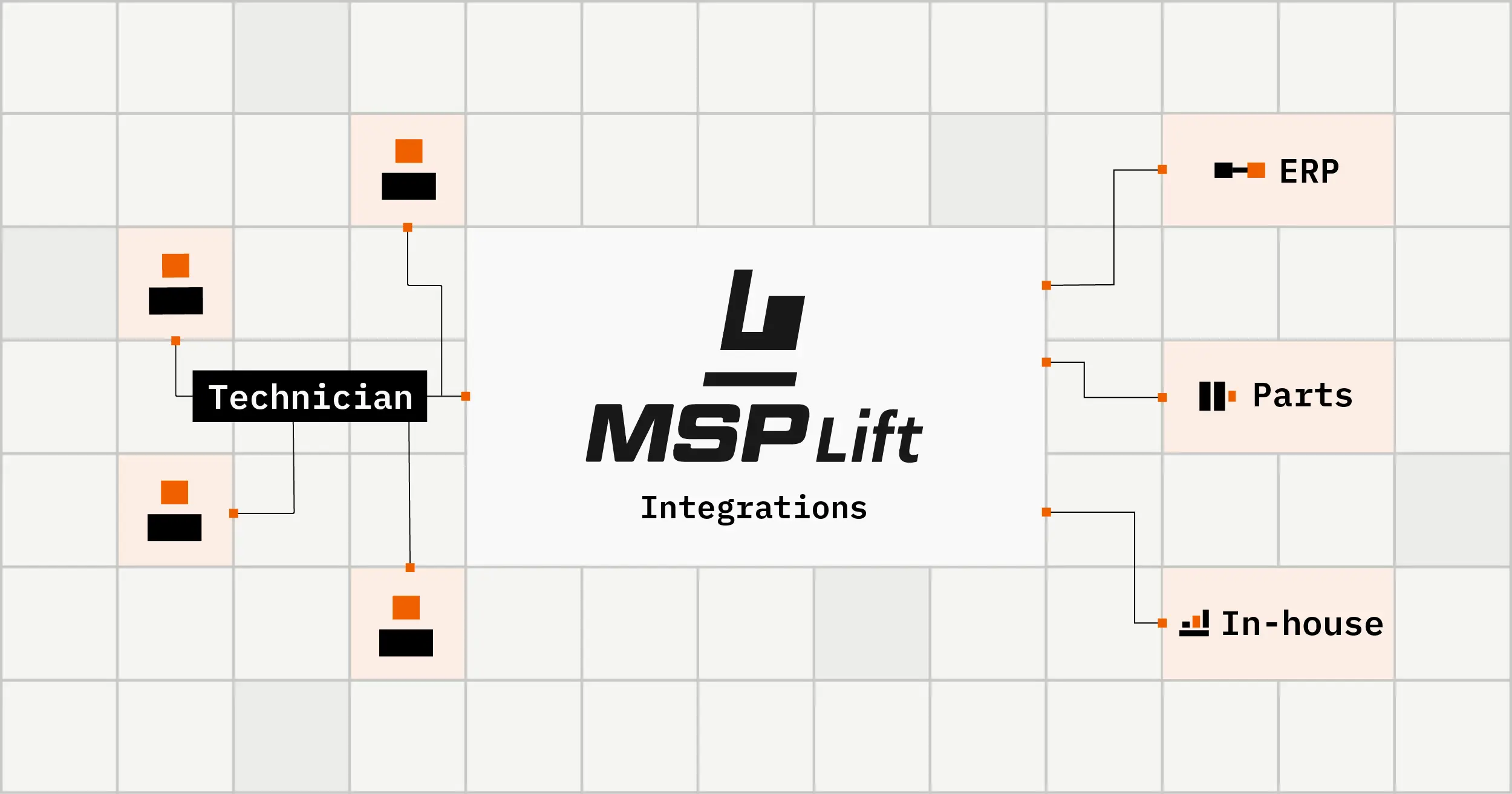
Dealers have changed their core business system and kept MSPLift as the constant in the field.
What it includes
No rip and replace
Work orders flow both ways
Parts and labour to your ERP
Customer and equipment records
Invoicing handoff
Cloud hosted
No on-premise hardware
No external ERP exposure

The fastest way to stop a field service project is to tell IT it starts with an ERP migration. This one does not.

Your business system stays exactly where it is.
MSPLift connects your technicians to it.
Data captured in the field flows through.
If you change the ERP later, MSPLift stays.

Why IT tends to relax

Nothing to host, nothing exposed externally, and no requirement to open the business system to outside access. The objections that usually stall these projects do not apply.

The constant in the field

Dealers have replaced their core business system and kept MSPLift running throughout. The technicians did not notice, which is the outcome you want.

existing connections

Systems we have connected before

Fifteen years of connecting field service to dealer business systems, major platforms and in-house ones alike.

NEEDS CONFIRMATION: which integrations are genuinely productised versus built per project. Claiming ready-built connectors we do not have is the fastest way to lose an IT lead.
What it includes
Major ERP platforms
In-house and bespoke systems
Legacy platforms
Parts and labor flows
Customer and equipment sync
Invoicing handoff
Documented process
Supported after go-live

Fifteen years of connecting field service to dealer business systems, from the major platforms to systems written in-house.

Tell us what you run.
We tell you honestly whether we have connected to it before.
If we have, you get the shorter route.
If we have not, it is scoped as a build rather than assumed.

Precision over reach

The person reading this card is the one most able to test the claim. We would rather name fewer systems accurately than imply coverage we cannot evidence.

bespoke integrations

Built for the system you actually run

Plenty of dealers run something in-house or unusual. That is a build, and one we have done many times.

The same team that builds the software connects it, so a change request is a change and not a project.
What it includes
In-house systems
Legacy platforms
Scoped before committing
Clear on what is feasible
Built and tested with you
Supported after go-live
Changes as you grow
Honest about limits

Customers consistently describe a flexible and honest response to requests: clear about what is feasible and what is not, rather than over-promising.

We look at what you run before anyone commits.
The work is scoped and the limits are stated.
It gets built and tested with your people.
It stays supported once it is live.

A clear no

Dealers tell us the honesty is a reason they stay. A clear no builds more trust than a slow maybe, and it costs everyone less.

The same team

The people who build the software connect it. That is why a change request is a change and not a project handed to someone who has never seen your setup.

manufacturing data

Equipment data without a second login

A dealer carrying thirty manufacturers should not need thirty portals to service them.

One screen, one login, whatever brand is on the machine.
What it includes
OEM data in the work order
No second portal
Mixed-brand fleets
Model and serial lookup
Parts information
Warranty status
Fewer clicks per job
Confirm current OEM coverage

A dealer carrying thirty manufacturers should not need thirty portals to service them.

The machine is identified on the work order.
Manufacturer data surfaces against it.
The technician stays in one place.
Warranty and parts information travel with the job.

Fewer clicks per job

Every second portal is a login, a search and a lost thread. Multiply that across a mixed fleet and it is a meaningful part of a technician’s day.

templates

Changed when your people need it changed

Forms and fields shaped to how your dealership works, not how the dealer down the road does.
It can be built to meet your expectations, and it adapts as we get bigger or as things need to change.
Fairchild Equipment — pending approval
What it includes
Template-based forms
Fields matched to your process
Changed on request
Different by branch or work type
No code required from you
Rolled out site by site
Adapts as you grow
Tested before it ships

Every dealership runs a little differently. Software that cannot accommodate that becomes the thing people work around.

Templates are shaped to your process at implementation.
Your people tell us what needs to change.
It gets changed, tested and shipped.
It keeps changing as the business does.

Why it matters for growth

Dealers who acquire other dealers need software that absorbs a new way of working rather than fighting it. Templates are how that happens without a rebuild.

No code required from you

Different forms by branch or by work type, changed on request. Your service manager describes what is needed; nobody has to learn a configuration tool.

the company

Fifteen years in this industry, and a team you will know by name

MSPLift was built from inside material handling by people who have done the work. Customers stay for the software, and tell us they stay for the team behind it

customers

Dealers running MSPLift today

MSPLift runs at dealerships across North America, from single sites to national groups with dozens of locations. Two shapes of customer, both served by the same product.

1 LOCATION
Single-location dealers

One site, one service department, and a service manager who knows every technician by name. Often coming off paper, spreadsheets, or a general-purpose tool that was never built for forklift service. MSPLift gives them what a national group runs, without the overhead of getting there.
24hr
from job complete to invoice out, down from 2–3 weeks
2 TO 70+ LOCATIONS
Regional and national dealer groups

Dozens of branches, hundreds of technicians, and a mix of systems inherited through acquisition. The problem is consistency: the same process at every site, without a rollout that stops the business. MSPLift deploys site by site, shaped to how each branch already works.

500+
technicians across 30 facilities, rolled out over two years
1 LOCATION
Single-location dealers

One site, one service department, and a service manager who knows every technician by name. Often coming off paper, spreadsheets, or a general-purpose tool that was never built for forklift service. MSPLift gives them what a national group runs, without the overhead of getting there.

24hr
from job complete to invoice out, down from 2–3 weeks
2 TO 70+ LOCATIONS
Regional and national dealer groups

Dozens of branches, hundreds of technicians, and a mix of systems inherited through acquisition. The problem is consistency: the same process at every site, without a rollout that stops the business. MSPLift deploys site by site, shaped to how each branch already works.

500+
technicians across 30 facilities, rolled out over two years

use cases

Where MSPLift earns its place

Three situations dealers tell us made the difference.

Emergency call-out. The technician opens the work order on arrival, sees what was done last time, fixes it and gets it signed before leaving site.
Contract maintenance. Interval work run against guaranteed-maintenance and OEM programme terms, across mixed-brand fleets.
Rollout after an acquisition. Crews come off pen and paper one facility at a time, not all at once.

the team

The team is the product

You do not buy software and disappear into a ticket queue.

Small and senior. The people who build MSPLift are the people who answer when you call.
Hours, not days. Customers cite responsiveness during outages as the reason they stay.
Straight about limits. We say what is feasible and what is not, rather than over-promising.
They know your setup. Not a queue, not a script, not a new name every time.

onboarding

One facility at a time

Rollout is structured, phased, and shaped around how your dealership already works.

Scoped before committing. We look at your systems and your process before anyone signs anything.
Built to your process. Forms and fields match how your people already work.
Site by site. One group rolled out across 30 facilities and roughly 500 technicians over two years.
Supported after go-live. The relationship starts at launch rather than ending there.

common questions

Before you get in touch

What is MSPLift?

MSPLift is field service software built for dealerships that sell and service forklifts, warehouse equipment and heavy machinery. Technicians open, run and close their own work orders on a tablet, with the full history of that machine, parts availability and their own van stock in front of them.

Who is MSPLift for?

Dealerships in North America that service material handling and heavy equipment. It is used by service managers, dispatchers, field technicians and the IT leads who own the dealership's systems. It is not built for HVAC, plumbing or electrical contracting.

Does MSPLift work without an internet connection?

Yes. Technicians capture time, parts, notes and photos with no connection, and everything syncs the moment the signal returns. There is no hold, no error screen and nothing to re-enter. Dealers have moved to MSPLift specifically because their previous tool could not do this.

Does MSPLift replace our ERP or dealer business system?

No. MSPLift connects to the business system you already run and leaves it in place. There is no on-premise hardware, and no requirement to expose your business system to outside access. Dealers have changed their core system and kept MSPLift running throughout.

How long has MSPLift been used in the material handling industry?

Fifteen years. It was built from inside the industry rather than adapted from general-purpose field service software, and is used by dealer groups running several hundred technicians across dozens of locations.

How is MSPLift different from general field service software?

Most field service tools are general-purpose products pointed at dealers. MSPLift was built for material handling from the start, so it already handles OEM programmes, guaranteed-maintenance contracts, mixed-brand fleets on a single work order, and the parts and labor flows a dealership actually runs.

Tell us what is going on in your service department

A real person gets back to you. We will ask how your technicians work now, what system you run, and where the time goes. If we are not a fit, we will say so.

Thank you! Your submission has been received!
Oops! Something went wrong while submitting the form.
No pricing pitch. No canned demo. Just a conversation.
Field service
Fleet management
Integrations
Company
Speak to a human